Write research faster without your findings leaving your computer. Fully offline.
Suggests sentence completions right where you type, in Word, Overleaf, Google Docs, or any writing app. Runs offline. Your pre-publication research stays pre-publication.
Whether it’s fluency or privacy, or both
Two reasons researchers choose Typeahead.
Writing fluency
Typeahead completes your sentence structures as you write, helping you close the gap between thought and written word. Especially useful for non-native English speakers who think clearly but want natural phrasing.
Research privacy
IRB agreements and pre-publication norms restrict what you can share with external services. Typeahead runs entirely on your Mac. Your unpublished findings never leave your device. It’s not a policy. It’s the architecture.
Features
Built for academic writing.
Your research never leaves your Mac
Pre-publication findings, participant data, and proprietary datasets all process on your device. Compatible with the strictest data use agreements.
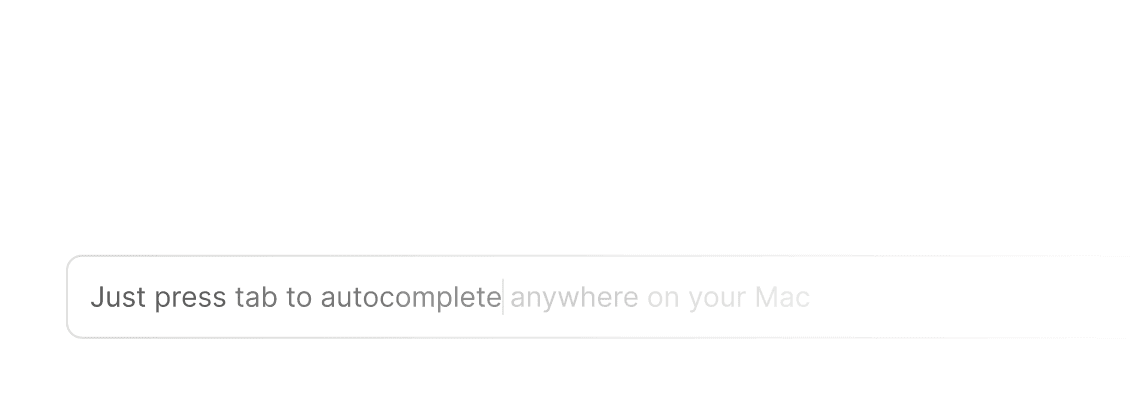
Completes your sentence as you type
Ghost text appears at your cursor with natural English completions. Tab to accept, keep typing to dismiss.
100% Private
No cloud, no telemetry, no account. Your unpublished work stays on your device.
Lightning Fast
Suggestions in under 100ms. No lag, no loading. Matches the speed of your thinking.
Every Writing App
Word. Google Docs. Overleaf. Obsidian. If you can type in it, Typeahead works.
One-Time Purchase
$79 once. Less than one month of Grammarly Premium, with stronger privacy.
Use Cases
How researchers use Typeahead.
Paper and thesis writing
The sections where writing slows are usually the transitional ones. Typeahead handles sentence-level scaffolding so you can focus on the substance.
Grant applications
High-stakes, formulaic, deadline-driven. Typeahead speeds through the standard structural language while you write the scientific content.
Literature reviews
Summarizing sources, comparing findings, building the argument. Typeahead completes the transitional and comparative language inline.
Academic communication
Emails to advisors, collaborators, and committees. Peer review reports. Typeahead works in your email client too.
Compatibility
Works in every academic writing tool.


Typeahead uses the macOS Accessibility API. It works in any app with a text field, including native apps, Electron apps, and browsers.
For IRB-Sensitive Research
AI writing help that doesn’t compromise
your data agreements.
Cloud AI tools process your input on their servers. IRB agreements, data use agreements, and pre-publication norms all restrict that. Typeahead processes everything on your Mac.
| Typeahead | ChatGPT | Grammarly | |
|---|---|---|---|
| Runs locally | |||
| Zero data transmission | |||
| Works offline | |||
| No account required | |||
| System-wide (every app) | |||
| One-time payment |
Typeahead
Typeahead is architecturally private. Your writing never touches a server. All AI processing stays on your Mac. The only network activity is license activation and optional update checks.
Buy once, own forever.
No subscriptions. No recurring fees. Pay once and Typeahead is yours for life.
Get early access to Typeahead with unlimited usage forever.
- Smart autocomplete in every Mac app
- Unlimited usage — no caps, no quotas
- All language models included
- Free updates for life
Why one-time?
Subscriptions incentivize retention tricks. One-time purchases incentivize building something so good you tell people about it. We chose the second one.
For Researchers
Your questions, answered precisely.
Typeahead works in browser-based text fields. Most Overleaf text editors support completions. Try it in your workflow to confirm.
Typeahead transmits nothing, so there are no external data flows to restrict. Check with your IRB if you need formal guidance, but architecturally there's nothing to disclose.
Typeahead predicts sentence structure based on what you're typing. It's not a fact source. Suggestions are linguistic patterns, not scientific claims. Always review.
Typeahead is a local Mac app that processes text on your device. Your writing never touches a server. The only network activity is license activation and optional update checks. Confirm with your IT department, but it should not fall under cloud AI policies.
Fully. No internet connection required after installation. Works on a plane, in a library, anywhere.
One-time purchase. $79. Less than one month of Grammarly Premium, with stronger privacy guarantees.
Less time on words. More time on the work.
Research is hard. Writing it up shouldn't be. Typeahead removes the typing friction so you can spend your hours on the ideas.
Fully offline. Cloud-free. Works in Word, Overleaf, Docs, and every writing app.